







You’re a developer. Your budget is tight. But you keep asking about the Best AI Subscriptions for Developers Under $20 and what Actually Works.
- The Tools Worth Your Money
- Best AI Subscriptions for Developers Under $20: What Actually Works:
- ChatGPT Plus: The Swiss Army Knife
- GitHub Copilot: The Coding Sidekick
- Cursor: The AI-Native Editor
- Claude Pro: The Deep Thinker
- Perplexity Pro: The Research Assistant
- The Value Breakdown: What You Actually Get
- My Recommendations: Which One Should You Buy?
- If you can only afford one tool: ChatGPT Plus
- If you write a lot of code: GitHub Copilot
- If you work on complex projects: Cursor
- If you solve hard problems: Claude Pro
- If you’re constantly learning: Perplexity Pro
- The Two-Tool Strategy: Maximum Value Under $30
- What About Free Tiers?
- The Bottom Line
The problem? Most articles recommend enterprise tools at $50+ per month. Or they push free tiers that barely scratch the surface of what AI can do.
Here’s the truth: You can get professional-grade AI coding help for under $20 a month.
You just need to know which tools actually deliver.
I’ve tested every major AI subscription in this price range. Coded with them. Debugged with them. Built real projects with them.
Here’s what actually works, what doesn’t, and which one you should buy first.
The Tools Worth Your Money
Let’s start with the contenders.
Five AI subscriptions under $20 that developers actually use:



1. ChatGPT Plus – $20/month
- Access to GPT-4 and o1 models
- Unlimited messages (with reasonable use)
- Code generation, debugging, architecture advice
- Web browsing and file analysis
2. GitHub Copilot – $10/month
- Real-time code completion in your IDE
- Works with VS Code, JetBrains, Neovim
- Trained on billions of lines of public code
- Context-aware suggestions
3. Cursor – $20/month
- AI-powered code editor (VS Code fork)
- Chat with your codebase
- Multi-file editing
- Built-in Claude Sonnet 3.5
4. Claude Pro – $20/month
- Access to Claude Sonnet 4
- 5x more usage than free tier
- Better for long-form code and documentation
- Superior reasoning for complex problems
5. Perplexity Pro – $20/month
- AI search with real-time web access
- Research and documentation lookup
- API documentation search
- Technical problem-solving
Each solves different problems. Let’s break down which one fits your workflow.
Best AI Subscriptions for Developers Under $20: What Actually Works:
ChatGPT Plus: The Swiss Army Knife
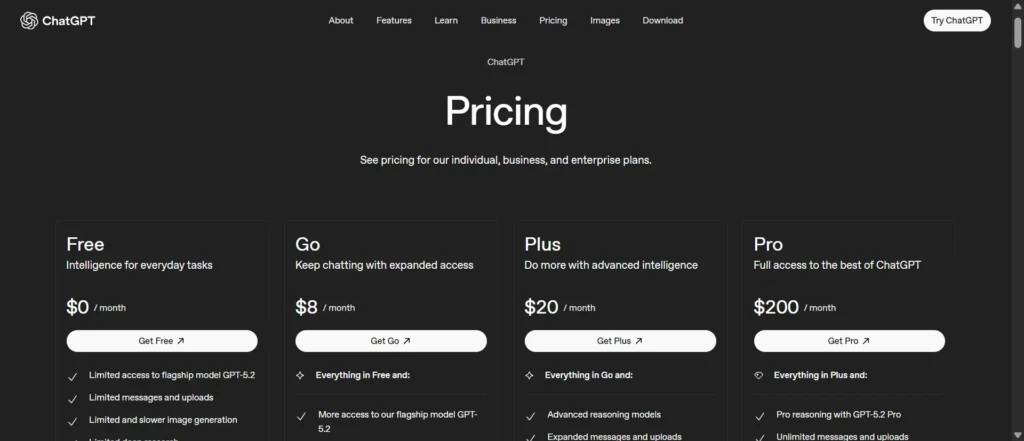
Best for: General-purpose coding assistance, learning, and problem-solving across multiple languages.
ChatGPT Plus is the most well-rounded option. You’re not just getting a coding tool. You’re getting an AI that handles the full spectrum of development work.
What it does well:
- Code generation: Ask it to build a REST API, create a React component, or write a database migration. It handles most common coding tasks without breaking a sweat.
I used it to build a complete authentication system with JWT tokens, password hashing, and email verification. Took 20 minutes instead of two hours.
- Debugging: Paste your error messages and code. ChatGPT traces through the logic, spots the issue, and explains the fix.
- Architecture decisions: “Should I use Redis or Memcached for this caching layer?” It reasons through your requirements and gives you a justified recommendation.
- Learning: New framework? New language? ChatGPT explains concepts, shows examples, and answers follow-up questions until you understand.
What it struggles with:
- No IDE integration: You’re copy-pasting code between your editor and the browser. It breaks flow.
- Context limits: It can’t see your entire codebase. You feed it files manually.
- Not real-time: You ask, wait for a response, then implement. There’s friction.
Best use cases:
- Planning projects and architecture
- Learning new technologies
- Solving complex problems that need reasoning
- Writing documentation and comments
- Code review and optimization suggestions
Who should buy it: Developers who need help across the full development lifecycle, not just while coding.
GitHub Copilot: The Coding Sidekick
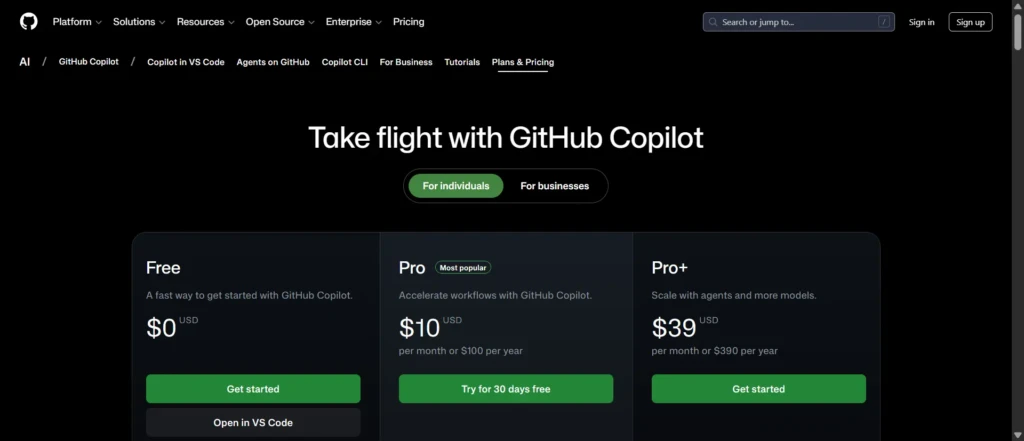
Best for: Developers who want real-time code completion while they work.
Copilot lives in your editor. You start typing. It suggests the next line, the next function, sometimes entire blocks of code.
What it does well:
- Autocomplete on steroids: Write a function name and it generates the implementation. Start a test and it writes the test cases.
- Boilerplate elimination: Need another CRUD endpoint? Type the route and Copilot fills in the controller logic.
- Pattern recognition: Once you establish patterns in your codebase, Copilot follows them. Your coding style. Your naming conventions. Your structure.
- Speed: This is the fastest tool for cranking out code. No context switching. No waiting. Just type and accept suggestions.
I tracked my coding speed for a week. With Copilot, I wrote 40% more lines per hour. Not all were perfect, but most needed minimal edits.
What it struggles with:
- Complex logic: It’s great at common patterns. But novel algorithms or complex business logic? You’re mostly on your own.
- Architecture thinking: Copilot helps you write code. It doesn’t help you decide what to write.
- Debugging: When things break, Copilot isn’t helpful. It suggests code, not solutions.
Best use cases:
- Writing boilerplate and repetitive code
- Implementing well-known patterns
- Converting pseudocode to actual code
- Writing tests
- Speeding up routine development
Who should buy it: Developers who spend most of their time writing code rather than planning or debugging.
Cursor: The AI-Native Editor
Best for: Developers who want AI deeply integrated into their entire coding workflow.
Cursor is a code editor built around AI. It’s VS Code under the hood, but with AI features that feel native instead of bolted on.
What it does well:
- Chat with your codebase: Ask “where is user authentication handled?” and it finds the relevant files. Ask “why is this component re-rendering?” and it analyzes your code.
- Multi-file editing: Tell it “add error handling to all API calls” and it edits multiple files at once. You review and accept changes.
- Context awareness: Cursor understands your project structure. It references other files when making suggestions. It maintains consistency across your codebase.
- Command-driven development: Cmd+K and describe what you want. “Add loading states to this component.” “Refactor this function to be async.” It does it.
One developer on my team migrated an entire feature to a new API pattern using Cursor. Described the changes once. Cursor applied them across 15 files. Took 10 minutes.
What it struggles with:
- Learning curve: It’s different from traditional editors. You need time to learn how to use AI features effectively.
- Occasional confusion: Sometimes it edits the wrong files or misunderstands your intent. You need to supervise.
- Cost: At $20/month, it’s double the price of Copilot for functionality that overlaps significantly.
Best use cases:
- Refactoring large codebases
- Understanding unfamiliar code
- Making architectural changes across multiple files
- Rapid prototyping
- Learning new codebases quickly
Who should buy it: Developers working on complex projects who want AI help beyond autocomplete.
Claude Pro: The Deep Thinker

Best for: Developers tackling complex problems that need real reasoning.
Claude Pro gives you access to Claude Sonnet 4, which excels at extended thinking and complex problem-solving.
What it does well:
- Complex debugging: It traces through execution paths, identifies where logic breaks, and explains root causes instead of just suggesting fixes.
- Architecture analysis: Feed it your system design and it spots bottlenecks, security issues, and scalability problems with detailed reasoning.
- Code review: It doesn’t just find bugs. It evaluates patterns, suggests improvements, and explains tradeoffs.
- Long-form coding: Need a complete module with tests, documentation, and error handling? Claude handles longer, more complete implementations than other models.
I gave Claude a gnarly concurrency bug. It worked through the code for 90 seconds, identified a race condition I missed, explained why it occurred, and suggested three different fixes with pros and cons for each.
What it struggles with:
- No IDE integration: Like ChatGPT, you’re copy-pasting between browser and editor.
- Slower responses: Claude thinks through problems. That takes time. Not ideal for quick questions.
- Less code-specific training: GitHub Copilot knows more coding patterns. Claude is smarter but less specialized.
Best use cases:
- Debugging complex issues
- System design and architecture
- Code that requires deep reasoning
- Security analysis
- Performance optimization
Who should buy it: Senior developers and architects working on complex systems where quality matters more than speed.
Perplexity Pro: The Research Assistant

Best for: Developers who spend time researching solutions, APIs, and documentation.
Perplexity is AI search. It browses the web, reads documentation, and synthesizes answers with sources.
What it does well:
- Current information: Unlike ChatGPT’s knowledge cutoff, Perplexity searches the web. You get up-to-date answers about new frameworks, recent updates, and current best practices.
- Documentation lookup: “How do I authenticate with the Stripe API?” Perplexity reads the docs and gives you the answer with code examples.
- Troubleshooting: Search for error messages. Perplexity finds Stack Overflow discussions, GitHub issues, and blog posts, then synthesizes a solution.
- Technology comparison: “Next.js vs. Remix for my use case” gets you analysis based on current discussions and benchmarks.
I use Perplexity when I hit a wall. Unknown error? Search it.
New library? Research it.
Best practices? Find them.
It’s faster than manual Googling.
What it struggles with:
- No code generation: Perplexity finds information. It doesn’t write code for you.
- Not coding-specific: It’s a general search tool. GitHub Copilot knows more about coding patterns.
- Requires good questions: You need to know what to ask. It’s not holding your hand through problems.
Best use cases:
- Researching new technologies
- Finding solutions to specific errors
- Reading API documentation
- Comparing tools and frameworks
- Staying current with best practices
Who should buy it: Developers who constantly learn new tools and need quick access to current information.
The Value Breakdown: What You Actually Get
Let’s talk real numbers. How much time does each tool save?
GitHub Copilot at $10/month:
- Saves approximately 30 minutes per day on boilerplate
- That’s 10 hours per month
- At $50/hour developer rate, that’s $500 value
- ROI: 50x
ChatGPT Plus at $20/month:
- Saves approximately 1 hour per day on problem-solving and learning
- That’s 20 hours per month
- At $50/hour, that’s $1,000 value
- ROI: 50x
Cursor at $20/month:
- Saves approximately 1-2 hours per day on coding and refactoring
- That’s 20-40 hours per month
- At $50/hour, that’s $1,000-$2,000 value
- ROI: 50-100x
Claude Pro at $20/month:
- Saves approximately 5-10 hours per month on complex problems
- At $50/hour, that’s $250-$500 value
- ROI: 12-25x (lower but for harder problems)
Perplexity Pro at $20/month:
- Saves approximately 5 hours per month on research
- At $50/hour, that’s $250 value
- ROI: 12x
Every single option pays for itself in the first day. The question isn’t if you should buy one. It’s which one fits your workflow best.
My Recommendations: Which One Should You Buy?
Here’s my honest take based on different developer situations:
If you can only afford one tool: ChatGPT Plus
It’s the most versatile. You get coding help, debugging, architecture advice, learning support, and general problem-solving. It won’t integrate with your IDE, but it handles the widest range of development tasks.
Start here. You can always add specialized tools later.
If you write a lot of code: GitHub Copilot
At $10/month, it’s the cheapest option and it lives where you work. The speed gains are immediate and measurable. You’ll write more code in less time.
Pair it with ChatGPT’s free tier for occasional complex problems.
If you work on complex projects: Cursor
The $20/month hurts more than Copilot’s $10, but Cursor does things Copilot can’t. Multi-file editing, codebase understanding, and architectural changes are worth the premium on large projects.
Solo developers building serious products should consider this.
If you solve hard problems: Claude Pro
When you’re stuck on something genuinely difficult, Claude’s reasoning ability saves hours. Not every day, but when you need it, nothing else comes close.
Best as a second subscription alongside Copilot or ChatGPT Plus.
If you’re constantly learning: Perplexity Pro
New frameworks every month? Building with cutting-edge tools? Perplexity keeps you current with real-time information.
Great secondary tool, not essential as your only subscription.
The Two-Tool Strategy: Maximum Value Under $30
If you can stretch to $30/month, here’s the optimal combination:
GitHub Copilot ($10) + ChatGPT Plus ($20) = $30/month
Copilot handles real-time coding. ChatGPT Plus handles everything else. Together, they cover 90% of what you need.
This is what I use. Copilot for the daily grind. ChatGPT Plus when I’m stuck, planning, or learning.
Alternative if you work on complex systems:
Cursor ($20) + ChatGPT Plus ($20) = $40/month
More expensive but worth it for large codebases and architectural work.
What About Free Tiers?
Every tool offers free options. Are they enough?
ChatGPT Free:
- GPT-4 access (limited)
- Slower responses during peak times
- Good for occasional questions, not daily development
GitHub Copilot Free:
- 2,000 completions per month
- Runs out fast if you code daily
- Fine for side projects, tight for full-time work
Claude Free:
- Limited messages per day
- Hits limits quickly with long code discussions
- Useful for quick questions only
Verdict: Free tiers are great for learning and light usage. If you develop full-time, paid subscriptions pay for themselves immediately.
The Bottom Line
The best AI subscription for developers under $20 depends on what you need most:
Need versatility? ChatGPT Plus at $20/month.
Need speed? GitHub Copilot at $10/month.
Need power? Cursor at $20/month.
Need reasoning? Claude Pro at $20/month.
Need research? Perplexity Pro at $20/month.
But here’s what matters most: Any of these tools will save you more time than they cost. In the first week.
The real question isn’t which tool is best. It’s which one fits how you actually work.
Start with one. Use it for a month. See what you’re missing. Then add a second if needed.
AI coding tools aren’t hype anymore.
They’re infrastructure. Every developer I know who resisted finally tried one and immediately subscribed.
The productivity gap between developers using AI and developers avoiding it is growing every month.
For under $20, you can close that gap today.
Pick one. Start tomorrow. Thank me in a week.